Highlight.js in Sketchware
1. This example shows how to use highlight.js library to display highlighted code in WebView.
2. In main.xml, add two Spinners spinner1 and spinner2, add an EditText edittext1, and a Button button1.
3. In permission manager, add INTERNET permissions.
4. Add an Intent component intent.
5. Add two List String code_languages and css_links.
6. In onCreate,
* Add all languages to code_languages using following code and display it in spinner1.
String[] languages = {

    "Html", "CSS", "C", "Cpp", "Rust", "Go", "Zig",

    "Java", "Kotlin", "JSON", "Scala", "Groovy",

    "JavaScript", "TypeScript", "Python", "Ruby", "PHP", "Perl",

    "Swift", "Dart", "Julia", "MATLAB",

    "Haskell", "OCaml", "Elixir", "Erlang",

    "SQL", "Bash", "Lua", "Assembly", "XML"

};

Collections.addAll(code_languages, languages);

* Add following css links to List css_links and display it in spinner2.
<!-- Default theme -->

<link rel="stylesheet" href="https://cdnjs.cloudflare.com/ajax/libs/highlight.js/11.9.0/styles/default.min.css">

<!-- GitHub theme (light) -->
<link rel="stylesheet"
      href="https://cdnjs.cloudflare.com/ajax/libs/highlight.js/11.9.0/styles/github.min.css">

<!-- GitHub Dark theme -->
<link rel="stylesheet"
      href="https://cdnjs.cloudflare.com/ajax/libs/highlight.js/11.9.0/styles/github-dark.min.css">

<!-- Atom One Dark (popular dark theme) -->
<link rel="stylesheet"
      href="https://cdnjs.cloudflare.com/ajax/libs/highlight.js/11.9.0/styles/atom-one-dark.min.css">

<!-- VS Code-like theme -->
<link rel="stylesheet"
      href="https://cdnjs.cloudflare.com/ajax/libs/highlight.js/11.9.0/styles/vs2015.min.css">

<!-- Monokai theme -->
<link rel="stylesheet"
      href="https://cdnjs.cloudflare.com/ajax/libs/highlight.js/11.9.0/styles/monokai.min.css">

<!-- Nord theme -->

<link rel="stylesheet" href="https://cdnjs.cloudflare.com/ajax/libs/highlight.js/11.9.0/styles/nord.min.css">
7. Create a new page highlight.xml.
8. In button1 onClick event, use intent to move to HighlightActivity, with extra keys code, language, and theme.

9. In highlight.xml, add a WebView webview1 with padding 0.
10. In asset manager, add a file index.html and put following codes in it.
<!DOCTYPE html>
<html>
<head>
*theme*
    <link rel="stylesheet" href="style.css">
</head>
<body>
<pre><code class="language-*lang*">
*code*
</code></pre>
    <script src="https://cdnjs.cloudflare.com/ajax/libs/highlight.js/11.8.0/highlight.min.js"></script>
    <script>
        // Auto-detect language and highlight all code blocks
        document.addEventListener('DOMContentLoaded', (event) => {
            document.querySelectorAll('pre code').forEach((block) => {
                hljs.highlightElement(block);
            });
        });
    </script>
</body>
</html>
11. Create another file called style.css in asset manager add put following codes in it.
/* Remove default margins and padding */
html, body {
    margin: 0;
    padding: 0;
    height: 100%;
}

/* Preformatted code blocks - full screen */
pre {
    position: relative;
    border-radius: 0; /* Remove rounded corners for full screen */
    overflow-x: auto;
    margin: 0;
    padding: 0;
    height: 100vh; /* Use full viewport height */
    width: 100vw; /* Use full viewport width */
    box-sizing: border-box;
}

pre code {
    display: block;
    padding: 1em;
    font-family: 'SFMono-Regular', Consolas, 'Liberation Mono', Menlo, Courier, monospace;
    font-size: 0.9em;
    line-height: 1.5;
    color: #f8f8f2;
    background: transparent;
    border: none;
    height: 100%;
    box-sizing: border-box;
}

/* Language label for code blocks */
pre::before {
    content: attr(data-language);
    position: absolute;
    top: 0;
    right: 0;
    background: #555;
    color: #fff;
    padding: 2px 8px;
    font-size: 0.8em;
    border-radius: 0 0 0 6px; /* Adjust border-radius since top-right is now 0 */
    font-family: -apple-system, BlinkMacSystemFont, 'Segoe UI', Roboto, sans-serif;
    z-index: 1;
}

/* Highlight.js overrides */
.hljs {
    background: transparent !important;
    color: #f8f8f2;
    border-radius: 0; /* Remove rounded corners */
    height: 100%;
    min-height: 100vh;
    box-sizing: border-box;
}

pre code.hljs {
    padding: 12px;
    height: 100%;
}

.hljs-keyword { color: #cc99cd; }
.hljs-string { color: #7ec699; }
.hljs-number { color: #f08d49; }
.hljs-function { color: #f08d49; }
.hljs-comment { color: #999; }
.hljs-title { color: #7ec699; }
.hljs-params { color: #f8f8f2; }
12. Create a more block of type String (returns string) with name parseHtml [String code] and put following codes in it.
return _code.replace("&", "&")
.replace("<", "<")
.replace(">", ">")
.replace("\"", """);
13. Create String variables code, parsedCode, language, theme, htmlContent.
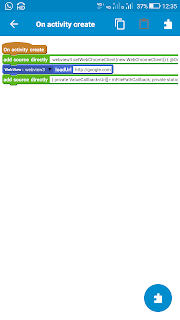
14. In onCreate event use codes and blocks as shown below.


Here the code for WebView is:
WebSettings webSettings = binding.webview1.getSettings();
webSettings.setJavaScriptEnabled(true);

binding.webview1.loadDataWithBaseURL(null, htmlContent, "text/html", "UTF-8", null);


Highlight.js is a popular syntax-highlighting library used to make code more readable by adding color and formatting to different programming languages, and while Sketchware is primarily a visual Android app development tool, developers sometimes look for ways to integrate such libraries to improve code display in WebView components or custom UI elements. In practice, this usually involves loading Highlight.js through HTML and JavaScript inside a WebView so that code snippets inside an app appear neatly formatted and easier to understand. Many beginners exploring app development also search online for guidance, tutorials, and community feedback, sometimes even typing things like take my online class for me reviews when looking for extra academic or coding support resources while managing multiple learning tasks.
ReplyDelete