Month and Year picker dialog in android project in Sketchware
1. In main.xml, add a TextView textview1, and a CalendarView calendarview2. When textview1 is clicked, the app will display a month and year picker dialog. When the month and year are selected from the dialog, it will display the selected month and year in textview1, and calendarview2.
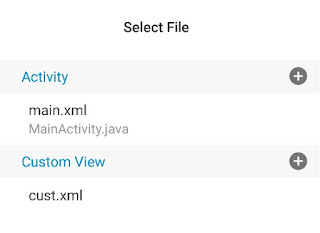
2. Add a custom view month_picker.xml. In this add a Spinner spinner1, and a GridView gridview1. The Spinner will display years for selection, and the GridView will display the months for selection.
3. Add a Calendar component cal.
4. Switch on AppCompat and design.
5. In onCreate, display the current month and year from Calendar cal in textview1.

6. Add two custom variables of type int with names year and month.


7. In calendarview2 onDateChanged event, update the date in Calendar component cal.

8. Create a more block setMonth with two int variables year and month. To add int variables, write parameter as m.int and variable as year or month.

Set the year and month of Calendar component using these variables and then display that month in calendarview2 and textview1. This more block will be used in the dialog when the year and month is selected.

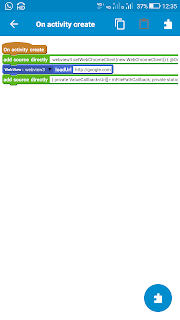
9. Create another more block showMonthPickerDialog and put following codes in it.
    final AlertDialog.Builder builder = new AlertDialog.Builder(MainActivity.this);
    builder.setTitle("Pick year and month");

    LayoutInflater inflater = this.getLayoutInflater();
    View dialog = inflater.inflate(R.layout.month_picker, null);
    final Spinner spinner1 = dialog.findViewById(R.id.spinner1);
    final GridView gridview1 = dialog.findViewById(R.id.gridview1);

    final int startYear = 1970;
    final int endYear = 2080;
    final int size = endYear - startYear + 1;
    String[] yearList = new String[size];
    for (int i = 0; i < size; i++) {
    yearList[i] = String.valueOf(startYear + i);
    }
    ArrayAdapter<String> myadapter = new ArrayAdapter<String>(getBaseContext(), android.R.layout.simple_spinner_dropdown_item, yearList);
	spinner1.setAdapter(myadapter);
	((ArrayAdapter)spinner1.getAdapter()).notifyDataSetChanged();
    spinner1.setSelection(year-startYear);

	spinner1.setOnItemSelectedListener(new AdapterView.OnItemSelectedListener(){
		@Override
		public void onItemSelected(AdapterView<?> adapter_view, View view, int position, long p){
			year = startYear + position;
		}
		@Override
		public void onNothingSelected(AdapterView<?> p1){

		}
	});

    final String[] monthlist = {"JAN", "FEB", "MAR",
		"APR", "MAY" , "JUN", "JUL", "AUG", "SEP",
        "OCT", "NOV", "DEC"};

	gridview1.setChoiceMode(GridView.CHOICE_MODE_SINGLE);
    gridview1.setSelector(android.R.color.holo_blue_light); // highlight color

    gridview1.setOnItemClickListener(new AdapterView.OnItemClickListener() {
    @Override
    public void onItemClick(AdapterView<?> parent, View view, int position, long id) {
        gridview1.setItemChecked(position, true);
        month = position;
        }
    });

	ArrayAdapter<String> adapter = new ArrayAdapter<>(this, android.R.layout.simple_list_item_activated_1, monthlist);
	gridview1.setAdapter(adapter);

    gridview1.post(new Runnable() {
        @Override
        public void run() {
            gridview1.setItemChecked(month, true);
            }
        });

    builder.setView(dialog)
        .setPositiveButton("UPDATE", new DialogInterface.OnClickListener() {
          @Override
          public void onClick(DialogInterface dialog, int id) {
            _setMonth(year, month);
          }
        })
        .setNegativeButton("CANCEL", new DialogInterface.OnClickListener() {
          public void onClick(DialogInterface dialog, int id) {
            AlertDialog _dialog = builder.create();
            _dialog.dismiss();
          }
        });

        builder.create().show();
Here is the same code with comments added:
// Create an AlertDialog builder in the current activity context
final AlertDialog.Builder builder = new AlertDialog.Builder(MainActivity.this);
builder.setTitle("Pick year and month"); // Set dialog title

// Inflate the custom layout for the dialog (month_picker.xml)
LayoutInflater inflater = this.getLayoutInflater();
View dialog = inflater.inflate(R.layout.month_picker, null);

// Get references to the Spinner (for year) and GridView (for month)
final Spinner spinner1 = dialog.findViewById(R.id.spinner1);
final GridView gridview1 = dialog.findViewById(R.id.gridview1);

// ------------------ SETUP YEAR SPINNER ------------------

// Define start and end years
final int startYear = 1970;
final int endYear = 2080;

// Calculate total number of years and create array
final int size = endYear - startYear + 1;
String[] yearList = new String[size];

// Fill the yearList with year values as strings (1970, 1971, ...)
for (int i = 0; i < size; i++) {
    yearList[i] = String.valueOf(startYear + i);
}

// Create an ArrayAdapter for the spinner using a simple dropdown layout
ArrayAdapter<String> myadapter = new ArrayAdapter<String>(
        getBaseContext(),
        android.R.layout.simple_spinner_dropdown_item,
        yearList
);

// Set the adapter to spinner
spinner1.setAdapter(myadapter);

// Notify the adapter that the data has changed (redundant but safe)
((ArrayAdapter)spinner1.getAdapter()).notifyDataSetChanged();

// Pre-select the spinner item based on current year (assuming `year` is defined)
spinner1.setSelection(year - startYear);

// Handle user selection from the spinner
spinner1.setOnItemSelectedListener(new AdapterView.OnItemSelectedListener() {
    @Override
    public void onItemSelected(AdapterView<?> adapter_view, View view, int position, long p) {
        // Update the selected year when user changes it
        year = startYear + position;
    }

    @Override
    public void onNothingSelected(AdapterView<?> p1) {
        // Do nothing if nothing is selected
    }
});

// ------------------ SETUP MONTH GRIDVIEW ------------------

// Define month names
final String[] monthlist = {
    "JAN", "FEB", "MAR", "APR", "MAY", "JUN",
    "JUL", "AUG", "SEP", "OCT", "NOV", "DEC"
};

// Allow only one item to be selected at a time
gridview1.setChoiceMode(GridView.CHOICE_MODE_SINGLE);

// Set the highlight color for the selected item
gridview1.setSelector(android.R.color.holo_blue_light);

// Handle month item clicks
gridview1.setOnItemClickListener(new AdapterView.OnItemClickListener() {
    @Override
    public void onItemClick(AdapterView<?> parent, View view, int position, long id) {
        gridview1.setItemChecked(position, true); // Highlight clicked item
        month = position; // Save selected month index
    }
});

// Create an adapter for the GridView with activated state layout
ArrayAdapter<String> adapter = new ArrayAdapter<>(
        this,
        android.R.layout.simple_list_item_activated_1,
        monthlist
);

// Set the adapter to GridView
gridview1.setAdapter(adapter);

// Post a runnable to select the current month after layout is complete
gridview1.post(new Runnable() {
    @Override
    public void run() {
        gridview1.setItemChecked(month, true); // Highlight the preselected month
    }
});

// ------------------ SETUP DIALOG BUTTONS ------------------

// Set the custom view and define button actions
builder.setView(dialog)
    // Positive button: apply selected year and month
    .setPositiveButton("UPDATE", new DialogInterface.OnClickListener() {
        @Override
        public void onClick(DialogInterface dialog, int id) {
            _setMonth(year, month); // Custom method to handle selection
        }
    })
    // Negative button: close the dialog without action
    .setNegativeButton("CANCEL", new DialogInterface.OnClickListener() {
        public void onClick(DialogInterface dialog, int id) {
            AlertDialog _dialog = builder.create();
            _dialog.dismiss();
        }
    });

// Finally, create and show the dialog
builder.create().show();
10. In textview1 onClick, set the values of int variables year and month using the Calendar component cal, and then use showMonthPickerDialog.
year = cal.get(Calendar.YEAR);
month = cal.get(Calendar.MONTH);



Comments
Post a Comment